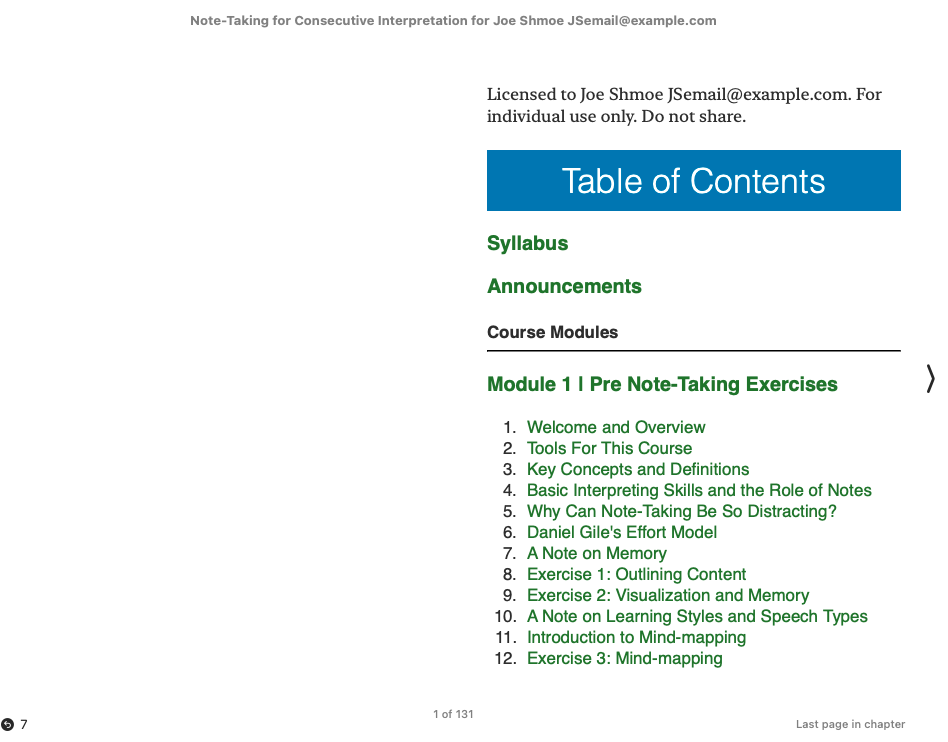
As Middlebury closes the MIIS campus, we are also closing our non-credit online offerings.
The courses were in Canvas and, in cases where the faculty agree, we wanted to provide students with ongoing access to the content.
We chose to export the Canvas courses as an ePub. Canvas supports that natively. There was also the desire to provide at least a small barrier/reminder not to share these courses with the world.
Without getting into DRM, there aren’t a ton of options. We went with embedding the student name and email into the ePub in a variety of locations. Can people unzip, remove personal information, repackage, and share? Yes. See the “modest” portion of the title.
For a one off, you just uzip it in terminal via unzip book.epub -d extracted_epub/ and then you can open up files and add some HTML stuff where ever you want. It’s useful to extract to a folder because it exports to a mimetype and two top-level directories which are easy to lose if you don’t have it contained. For the record, you do need all three.
The main content is in the OEBPS directory. The main content is in the .xhtml files. You could do a global find/replace for
and add your personalization text. I also added it to the package.opf file in the dc:title element. That’s what gives it the title in the ePub reader.I had some issues with the image paths, which were some variable structure. So I saw this mess $IMS-CC-FILEBASE$/Uploaded%20Media/IMG_0553.jpeg?canvas_=1&canvas_qs_wrap=1″ and I just replaced them all with relative paths like media/Uploaded Media/IMG_0553.jpeg. I don’t know/didn’t care enough to figure out what was happening to cause that. Looking at it now, I still don’t care.
I did, however, need to make more than one of these. So I made one expanded export with fixed media paths. To build the template, I just put
<
where I wanted it.
I could have just let that lie and don’t a global find/replace and then re-bundle as ePub but because I can cheat and use Claude, I did.
That gave me this bash script which will do it all in one go and rename the file as well so I give the right person the right book.
To use it, I navigate to my epub folder (where the bash script and template files are) in terminal and run this command ./make_epub.sh “Joe Shmoe” “JSemail@example.com”
That gives me a re-bundled ePub with all the variables filled in and any stray .git, .claude, or other files kept out.
I might have found a way to do this pre-Claude, but it wouldn’t have been this. I am liking bash scripts more and more.
#!/bin/bash
# Usage: ./make_epub.sh "First Last" "email@example.com"
#
# Replaces <<name>> and <<email>> placeholders throughout the epub source
# (a copy, not the template itself) and packages the result as a valid
# .epub named "<name> - <docTitle>.epub", where <docTitle> comes from
# OEBPS/toc.ncx.

set -euo pipefail

usage() {
  echo "Usage: $0 \"First Last\" \"email@example.com\"" >&2
  exit 1
}

[[ $# -eq 2 ]] || usage
NAME="$1"
EMAIL="$2"

SCRIPT_DIR="$(cd "$(dirname "${BASH_SOURCE[0]}")" && pwd)"
SRC_DIR="$SCRIPT_DIR"
NCX_FILE="$SRC_DIR/OEBPS/toc.ncx"

[[ -f "$NCX_FILE" ]] || { echo "Cannot find $NCX_FILE" >&2; exit 1; }

DOC_TITLE=$(sed -n 's/.*<text>\(.*\)<\/text>.*/\1/p' "$NCX_FILE" | head -1)
[[ -n "$DOC_TITLE" ]] || { echo "Could not read docTitle from toc.ncx" >&2; exit 1; }

OUT_DIR="$(cd "$SCRIPT_DIR/.." && pwd)"
OUT_PATH="$OUT_DIR/${NAME} - ${DOC_TITLE}.epub"

[[ -e "$OUT_PATH" ]] && { echo "Refusing to overwrite existing file: $OUT_PATH" >&2; exit 1; }

WORK_DIR="$(mktemp -d)"
trap 'rm -rf "$WORK_DIR"' EXIT

# Work on a throwaway copy so the template in $SRC_DIR is left untouched
# and can be reused for the next student.
rsync -a \
  --exclude '.claude' \
  --exclude '.git' \
  --exclude '*.epub' \
  --exclude "$(basename "$0")" \
  "$SRC_DIR"/ "$WORK_DIR"/

# Replace placeholders in text-based content files only (skip binary media).
find "$WORK_DIR" -type f \
  \( -name '*.xhtml' -o -name '*.ncx' -o -name '*.opf' -o -name '*.xml' -o -name '*.html' -o -name '*.htm' \) \
  -exec env NAME="$NAME" EMAIL="$EMAIL" perl -pi -e \
    's/<<name>>/$ENV{NAME}/g; s/<<email>>/$ENV{EMAIL}/g;' {} +

# Build the epub. The mimetype file must be the first entry and stored
# uncompressed for the archive to be a valid/well-formed epub.
(
  cd "$WORK_DIR"
  zip -X0 "$OUT_PATH" mimetype > /dev/null
  zip -rgX9 "$OUT_PATH" . -x mimetype > /dev/null
)

echo "Created: $OUT_PATH"