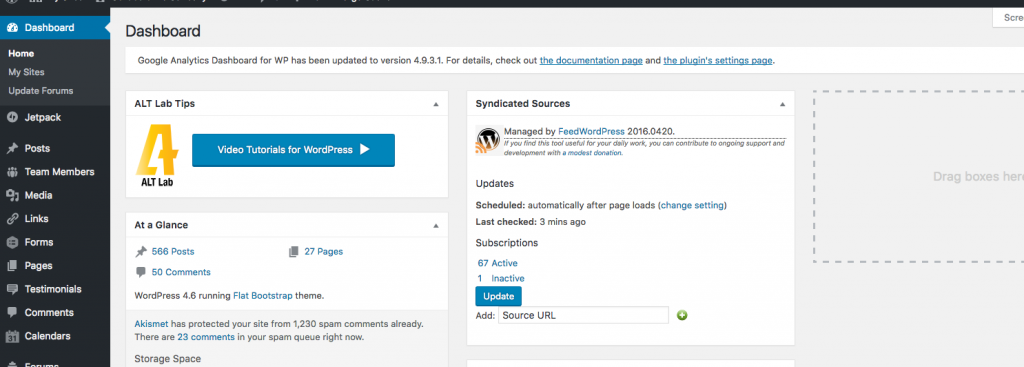
Nothing fancy here but maybe useful to someone. Based on a faculty member request, I took the WP widget API default code and created a little dashboard widget to put a link to the Lynda.com WordPress tutorials on every dashboard page (network activated).
Can’t hurt and I think I’ll end up expanding this into a messaging system so I can publish “breaking” news and other useful tips.
<?php
/*
Plugin Name: ALT Lab add to Dashboard
Plugin URI:  https://github.com/woodwardtw/altlab-dashboard-adder
Description: This allows you to add stuff to the dashboards of sites
Version:     1.0
Author:      Tom Woodward
Author URI:  http://bionicteaching.com
License:     GPL2
License URI: https://www.gnu.org/licenses/gpl-2.0.html
Domain Path: /languages
Text Domain: my-toolset

*/
defined( 'ABSPATH' ) or die( 'No script kiddies please!' );

function altlab_add_dashboard_widgets() {
 	wp_add_dashboard_widget(
 		'altlab_dashboard_widget',
 		'ALT Lab Tips',
 		'altlab_dashboard_widget_function' );

 	// Globalize the metaboxes array, this holds all the widgets for wp-admin

 	global $wp_meta_boxes;

 	// Get the regular dashboard widgets array
 	// (which has our new widget already but at the end)

 	$normal_dashboard = $wp_meta_boxes['dashboard']['normal']['core'];

 	// Backup and delete our new dashboard widget from the end of the array

 	$altlab_widget_backup = array( 'altlab_dashboard_widget' => $normal_dashboard['altlab_dashboard_widget'] );
 	unset( $normal_dashboard['altlab_dashboard_widget'] );

 	// Merge the two arrays together so our widget is at the beginning

 	$sorted_dashboard = array_merge( $altlab_widget_backup, $normal_dashboard );

 	// Save the sorted array back into the original metaboxes

 	$wp_meta_boxes['dashboard']['normal']['core'] = $sorted_dashboard;
}


add_action( 'wp_dashboard_setup', 'altlab_add_dashboard_widgets' );

/**
 * Create the function to output the contents of our Dashboard Widget.
 */
function altlab_dashboard_widget_function() {

	// Display whatever it is you want to show.
	echo '
	<img src="http://altlab.vcu.edu/wp-content/uploads/2014/07/ALT-Lab-logo-color1.png">
	<a class="wp-core-ui button button-primary button-hero" style="margin: 15px;" href="https://www.lynda.com/WordPress-tutorials/WordPress-Essential-Training/372542-2.html?org=vcu">
	  Video Tutorials for WordPress <span class="dashicons dashicons-controls-play" style="font-size:2em; padding-top:8px;"></span>
	</a>';
}