If you swish it around in your mouth and gargle a bit, you’ll taste notes of saffron and coriander! What a nose! Such mouthfeel!1
See folks,2 I am not even hiding my nonsense in the comments any more. That’s one of the refreshing things about having your own site.
Because academic projects have timelines that align to astrological signs mixed with lunar tides, I’m back working on the Maidu translation site. Last post on it was probably this around January. It’s probably more helpful to think of it as a general site for translations now. Maidu is a bit niche, even for me.
This is going to be a bit of a journey across platforms and languages. I do/did use AI at various times to help me figure stuff out. It is what it is.
We’ve got some new interface options so we can handle audio files.
I guess I didn’t post about it, but at some point I made this example single pager that shows how audio can highlight the text as it plays. It’s using Transcript Tracer JS.
That’s dependent on generating the VTT file. We can do that with this python-y stuff. espeak is deprecated, but worked fine. Maybe I should bump to MMS. It did a pretty good job on the test file so we’ll wait and see.
NumPy and Aeneas (audio/text syncing) are in Python land.
Right now, I’ve done this once and I haven’t tried to tie it into any workflows. I think I’ll just have to do it for now. That’s not terrible. Down the road, I could build it into Reclaim Cloud or some other container service . . . maybe hook that into WP where once a translation has text and an audio file, it hits an endpoint to generate and save the VTT file back to WP for tweaking.
# system deps
brew install ffmpeg espeak   # I use brew on the mac - it's like apt on Linux

# python
pip install numpy aeneas

# downsample to what aeneas likes
ffmpeg -i LA30_041_001.wav -ac 1 -ar 16000 -sample_fmt s16 audio.wav

# save the transcript as transcript.txt, one phrase per line

python -m aeneas.tools.execute_task \
  audio.wav transcript.txt \
  "task_language=spa|is_text_type=plain|os_task_file_format=vtt" \
  alignment.vtt
There’s no Maidu language option so the task_language is set to Spanish. I think it worked well.
That gives you a text that looks something like this.
WEBVTT 1 00:00:00.000 --> 00:00:08.600 Wólem májdym unÃm k'ódo 'ymÃtdom, 2 00:00:08.600 --> 00:00:15.200 'Ãnjanà wi'Ãpem k'ódojdì k'ódom'Ãynnan, 3 00:00:15.200 --> 00:00:17.800 momÃm jymmotòpem kÃwnan 'ysÃtopindom, 4 00:00:17.800 --> 00:00:20.440 'unÃm k'ódo 'ymÃtwonòm 5 00:00:20.440 --> 00:00:23.760 'Adóm 'unÃm k'ódo 'ékdadòjkynan, 6 00:00:23.760 --> 00:00:27.120 'yc'ópindom, 'yc'ópindom, 7 00:00:27.120 --> 00:00:36.880 kak'án 'unÃm k'ódo'éswomìtdom.
To WordPress
To move from this single example, the ACF stuff is pretty straight forward, just places to put an audio file and a vtt file. These are simple file upload options.
On the front end, I thought it’d be cool to display the waveform of the audio. I used Wave Surfer to do that.
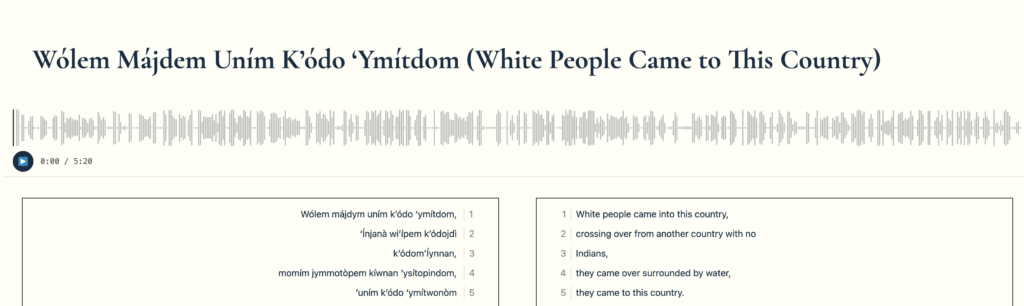
This example has an audio form and a VTT file so it does a decent job of highlighting the phrases as it plays.
On the back end, we wanted an option to play the audio while adjusting the line breaks so the Maidu text aligns with how it’s spoken.
// Show audio player in editor when audio_file has a value.
add_action( 'acf/render_field/name=audio_file', 'dlinq_render_audio_player_in_editor' );
function dlinq_render_audio_player_in_editor( $field ) {
	if ( empty( $field['value'] ) ) {
		return;
	}

	$file = $field['value'];
	$url  = is_array( $file ) ? ( $file['url'] ?? '' ) : wp_get_attachment_url( $file );

	if ( ! $url ) {
		return;
	}

	$escaped_url = esc_url( $url );
	echo "<div class='acf-audio-preview'>
			<audio controls style='width: 100%; max-width: 500px;'>
				<source src='{$escaped_url}'>
			</audio>
		</div>";
}
Then we stick it in the corner so we can do our editing.
.acf-audio-preview {
	position: fixed !important;
	right: 16px;
	bottom: 16px;
	z-index: 100000;
	background-color: #efefef;
	padding: 10px;
	border: 2px solid #151414;
	border-radius: 4px;
	box-shadow: 0 2px 8px rgba(0, 0, 0, 0.15);
	width: 300px;
	margin-top: 8px;
}
I also added a search function to the top of each translation. That uses Mark.js to give a simple search interface that highlights terms and provides navigation across all found terms. I probably need to map some keys to the next/previous function.
To do it right we’ve got to enqueue the scripts in the right order and just for translation pages.
add_action( 'wp_enqueue_scripts', 'dlinq_markjs_scripts' );
function dlinq_markjs_scripts() {
    if ( ! is_singular( 'translation' ) ) {
        return;
    }
    wp_enqueue_script(
        'markjs',
        'https://cdnjs.cloudflare.com/ajax/libs/mark.js/8.11.1/mark.min.js',
        array(),
        '8.11.1',
        true
    );
    wp_enqueue_script(
        'dlinq-translation-search',
        get_template_directory_uri() . '/js/translation-search.js',
        array( 'markjs' ),
        filemtime( get_template_directory() . '/js/translation-search.js' ),
        true
    );
}
/* Translation page search — requires Mark.js loaded as a global */

var searchInput = document.getElementById( 'translation-search-input' );
var searchCount = document.getElementById( 'translation-search-count' );
var searchClear = document.getElementById( 'translation-search-clear' );
var prevBtn     = document.querySelector( "button[data-search='prev']" );
var nextBtn     = document.querySelector( "button[data-search='next']" );

if ( searchInput ) {
	var markInstance  = new Mark( document.querySelectorAll( '.text-box' ) ); // eslint-disable-line no-undef
	var currentClass  = 'current';
	var offsetTop     = 50;
	var currentIndex  = 0;
	var results       = [];

	function jumpTo() {
		if ( ! results.length ) { return; }
		results.forEach( function( el ) { el.classList.remove( currentClass ); } );
		var current = results[ currentIndex ];
		if ( current ) {
			current.classList.add( currentClass );
			window.scrollTo( 0, current.getBoundingClientRect().top + window.scrollY - offsetTop );
		}
	}

	function doSearch() {
		var term = searchInput.value.trim();
		markInstance.unmark( {
			done: function() {
				results       = [];
				currentIndex  = 0;
				if ( ! term ) { searchCount.textContent = ''; return; }
				markInstance.mark( term, {
					separateWordSearch: false,
					done: function( count ) {
						results               = Array.from( document.querySelectorAll( '.text-box mark' ) );
						searchCount.textContent = count > 0 ? count + ' found' : 'none';
						jumpTo();
					},
				} );
			},
		} );
	}

	searchInput.addEventListener( 'input', doSearch );

	searchClear.addEventListener( 'click', function() {
		searchInput.value       = '';
		searchCount.textContent = '';
		results                 = [];
		currentIndex            = 0;
		markInstance.unmark();
	} );

	if ( nextBtn ) {
		nextBtn.addEventListener( 'click', function() {
			if ( ! results.length ) { return; }
			currentIndex = ( currentIndex + 1 ) % results.length;
			jumpTo();
		} );
	}

	if ( prevBtn ) {
		prevBtn.addEventListener( 'click', function() {
			if ( ! results.length ) { return; }
			currentIndex = ( currentIndex - 1 + results.length ) % results.length;
			jumpTo();
		} );
	}
}
Anyway, that’s the start of a more interesting, interactive, multimodal experience with a translation.
Next post, I’ll get around to the VTT adjustment page . . .
The idea of clicking on lines and being brought to that audio is cool, would be slick for a podcast transcript, right? I have two of those we can test it out with. Pull transcript from YouTube (and Audio) directly into WP post. Also have some AI summarize podcast so all this can just go on the blog without intervention.
Now that’s a fine wine, matey.
I think I saw this interaction many years ago on a news site and it stuck with me. Seems like a dream for multimodal learning and efficiently going through mixed media stuff. Win. Win.
A YouTube integration that does it automatically would be possible . . . depending on YouTube’s API allowances, use the new WP AI stuff . . .