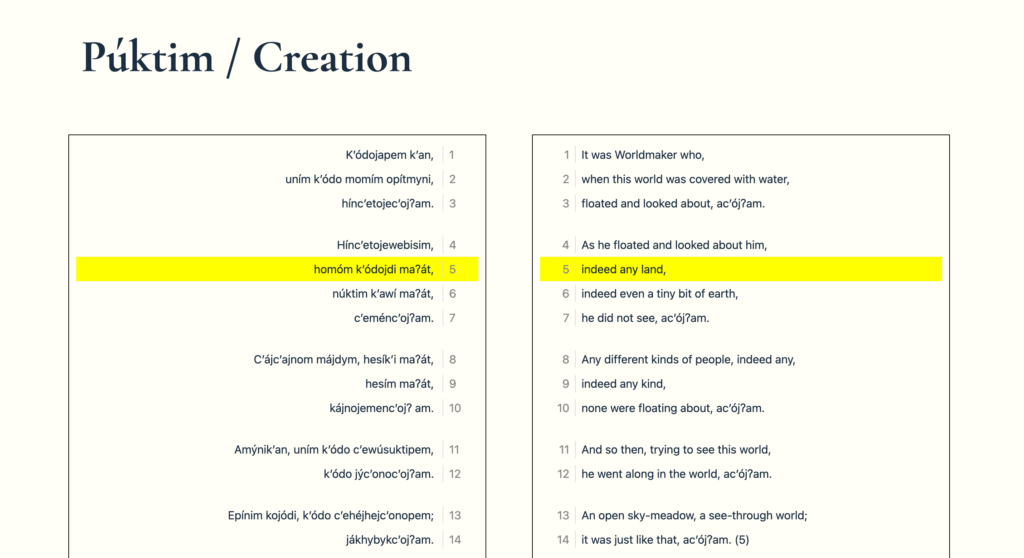
I’m working with an anthropology professor to put some Maidu stories online. You can see a functional version of it here. The basic idea is to show the original text on the left and pair it with the English translation. From there, we’re trying to figure out the other things that the site should do. It’s my basic Understrap-based theme that uses ACF. It’s available here if you want it.
There are some little tricks like clicking on a line adds a highlight to both lines. Those selections are preserved in the URL via parameters. Clicking them again removes them. That let’s you share stories with certain sections highlighted. You can see an early non-WordPress demo in Codepen here. It needs some additional work but the line numbers are added via CSS. I’ve still got some work to do there but it works pretty well.
.translated .line:before {

      content: counter(line);
      display: inline-block;
      border-right: 1px solid #ddd;
      padding: 0 .5em;
      margin-right: .5em;
      color: #888;
      width: 30px;
}

.original .line:after {

      content: counter(line);
      display: inline-block;
      border-left: 1px solid #ddd;
      padding: 0 .5em;
      margin-left: .5em;
      color: #888;
      width: 30px;

}
On the admin side, I’ve now got the two text fields that hold the original and the translation scrolling in parallel. That need came up because my sample stories were pretty short but the actual stories ended up being much longer. It can be a pretty big hassle to try to match the lines. I need to add a line count there as well.
I’m considering how to do more with word/phrase highlighting. I found a javascript library that might be a nice option and have little demo set up on Codepen.1 I also want to figure out how we do searches across stories and what that display looks like. It’s not an easy problem. We’ve got some additional questions about how to deal with locations and whether we’re going to do some sort of Rap-Genius-style annotation for words and lines.
There’s also a data focused class going on that’s exploring the text with R. To make that easier, I wrote up how they could easily access the data via the REST API. While this is site specific, it might point out some nice options people can use in other scenarios.
REST API Access
The translations are a custom post type called “translation” and the textual data is written to two fields (original_text and translation) that are in the parent field acf.
Foundation
This is the URL that returns the translation custom post type JSON
https://experiments.middcreate.net/text-rethink/wp-json/wp/v2/translation
Specifying data
You can remove extra data by using parameters like below, which fetches just the acf data (where our translation and original reside) and title of the translation posts.
https://experiments.middcreate.net/text-rethink/wp-json/wp/v2/translation?_fields=acf,title
You can control how many translations are returned with the per_page parameter.
Pagination is achieved with the page parameter which can be used in conjunction with the per_page parameter.
You can also call a single translation using the id.
https://experiments.middcreate.net/text-rethink/wp-json/wp/v2/translation/16
Or call multiple translations using comma delimited post ids.
https://experiments.middcreate.net/text-rethink/wp-json/wp/v2/translation?include=16,19
1 You’ll note that I do those little breakout tests pretty frequently. I find it useful.